.svg)

.svg)
%201.svg)


A UX audit is a structured review of a product's usability, accessibility, and visual design that identifies friction points and produces prioritized recommendations. Teams run an audit to fix low conversion rates, reduce churn, or prepare for a redesign before spending money on new features.
If your SaaS product's sign-up rate is dropping, or users keep abandoning your dashboard mid-task, a User Experience audit tells you exactly where the experience breaks down and why. This guide covers Defination, how to conduct one in 7 steps, a full UX audit checklist, and the tools professional auditors use for websites.
What Is a UX Audit?
A UX audit is a systematic evaluation of a digital product's user experience, covering usability, accessibility, visual design, content, and conversion flows, that results in a prioritized list of issues and fixes. It combines quantitative data (analytics, heatmaps) with qualitative research (heuristic evaluation, user interviews) to explain not just what is failing, but why.
Unlike UI vs UX design reviews that focus only on visuals, a UX audit examines the full user journey: navigation, information architecture, forms, onboarding, and checkout. It answers 3 questions:
- What is stopping users from completing their goals?
- How severe is each issue, and what does fixing it require?
- Where should the team focus first for the highest impact?
Why Should You Conduct a UX Audit?
Poor UX directly increases customer acquisition cost and drops conversion rates. A UX audit gives you 6 measurable benefits:
- Reduces drop-off points in sign-up, checkout, or onboarding flows.
- Improves customer satisfaction by removing confusing steps.
- Lowers development waste by directing engineering effort to the highest-impact fixes instead of guesswork.
- Supports data-driven decisions with evidence that stakeholders can act on.
- Increases retention and lifetime value by fixing recurring friction.
- Benchmarks your product against competitors and industry best practices, similar to what the top UX audit agencies deliver for clients.
Even a small conversion lift compounds. A SaaS product moving from a 3% to a 3.5% trial-to-paid conversion rate can add hundreds of thousands of dollars in annual recurring revenue without a single new feature.
When to Conduct a UX Audit?
Run a UX audit at 5 specific moments in your product's lifecycle:
- Before a redesign. Ground the new design in evidence instead of opinion. See our SaaS website redesign guide for how audits feed into the redesign scope.
- After a metrics drop. A sudden fall in activation, retention, or conversion signals a UX regression worth investigating, especially if it lines up with rising SaaS churn rates.
- Before a product launch. Catch usability issues before real users do. Our SaaS product launch guide covers pre-launch QA in more depth.
- When user complaints increase. Repeated support tickets about the same flow are a clear audit trigger.
- On a recurring schedule. Fast-shipping teams should audit every 3 months. Slower-moving teams can audit every 6 to 12 months.
How to Conduct a UX Audit: 7 Steps
Here is the process professional auditors follow to conduct a UX audit that produces actionable, prioritized recommendations.
Step 1: Define Business Objectives and Scope
Start every UX audit by clarifying the business goal behind it, not just the design problems. Meet with stakeholders and ask what "success" looks like: fewer support tickets, higher trial conversion, faster onboarding completion, or lower cart abandonment.
Once the objective is clear, define the scope. Decide which platforms (desktop, mobile, tablet), which user segments, and which flows you'll review. Auditing an entire product at once is rarely realistic. Instead, prioritize the highest-traffic or highest-revenue journeys first, such as SaaS onboarding or checkout.
Step 2: Collect Quantitative and Qualitative Data
Before evaluating any screen, gather existing product data. This includes:
- Web and product analytics: bounce rate, exit rate, session duration, funnel completion
- Heatmaps and click maps showing where users interact (or don't)
- Session replays showing real user paths and rage clicks
- Past SaaS metrics reports and previous audits, if available
- Support tickets, NPS scores, and user surveys
This data tells auditors where to look before they open a single screen, and it prevents the audit from becoming a list of personal design opinions.
Step 3: Map User Flows
Break the product down into discrete user journeys instead of reviewing random screens. Map each flow, sign-up, onboarding, dashboard navigation, checkout, step by step, noting entry points, decision points, and exit points.
For SaaS products, common flows worth mapping include the dashboard experience, admin panel workflows, and core B2B product screens. Mapping flows first prevents auditors from missing the connective tissue between screens, where a large share of usability problems actually live.
Step 4: Run a Heuristic Evaluation
A heuristic evaluation applies established usability principles to spot design flaws without needing live user tests. Jakob Nielsen's 10 usability heuristics remain the industry standard:
- Visibility of system status
- Match between the system and the real world
- User control and freedom
- Consistency and standards
- Error prevention
- Recognition rather than recall
- Flexibility and efficiency of use
- Aesthetic and minimalist design
- Help users recognize, diagnose, and recover from errors
- Help and documentation
Use 3 to 5 evaluators to reduce individual bias, and document every issue with a screenshot, the violated heuristic, and a severity rating (low, medium, high). This step overlaps with the principles behind user-centered design, where every decision is traced back to a real user need rather than aesthetic preference.
Step 5: Conduct Further Research and Testing
Heuristic evaluation identifies likely problems; further research confirms them. Depending on scope and budget, layer in:
- Usability testing: moderated or unmoderated sessions where real users attempt tasks. Read our comparison of concept testing vs usability testing to pick the right method for your stage.
- Accessibility evaluation: check color contrast, keyboard navigation, screen reader compatibility, and WCAG compliance using tools like Google Lighthouse or Axe DevTools.
- Content review: assess clarity, tone, and CTA wording across the product.
- Visual design review: check typography, spacing, and consistency. Typography choices matter more than most teams assume; see our guide on best fonts for UI design.
- Competitive benchmarking: compare your flows against 3 to 5 direct competitors to spot gaps and opportunities.
Step 6: Prioritize Findings and Build the Report
Group every issue by theme (navigation, forms, accessibility, visual design) and rank severity as critical, major, or minor. Critical issues block task completion; major issues slow users down or cause confusion; minor issues are polish items.
A strong UX audit report includes 6 sections:
- Executive summary with the top findings
- Objectives and methodology
- Data and research results
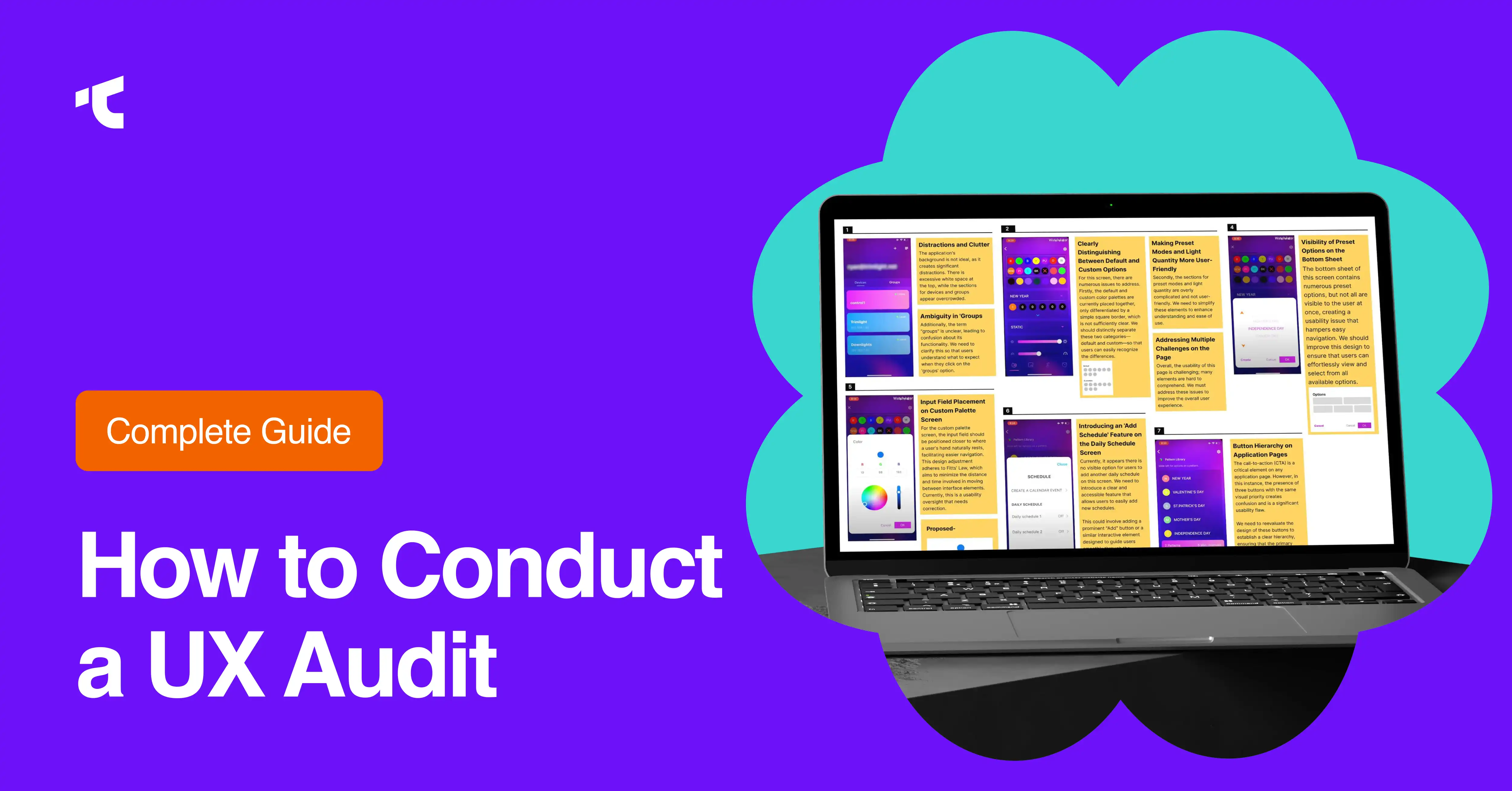
- Detailed findings with screenshots
- Prioritized recommendations
- Suggested next steps and timeline
Avoid judgmental language like "this is badly designed." Ground every observation in behavior: "Session replays show 68% of users hesitated before submitting the form, suggesting the field order does not match the expected input hierarchy."
Step 7: Present Findings and Implement Changes
Share the report with all relevant stakeholders, not just designers. Product managers care about business impact; engineers care about scope and effort; designers want detail on the specific heuristic violated. Tailor the presentation to the room.
Assign clear owners and deadlines for each recommendation. An audit that ends without an action plan rarely produces results. If your internal team lacks bandwidth to implement fixes, working with a specialized SaaS UX design agency can move recommendations into shipped changes faster.
UX Audit Checklist
Use this checklist to keep every audit consistent and complete. It covers 9 categories.
Usability
- Can users complete core tasks without confusion?
- Are error messages clear and specific?
- Is interaction behavior consistent across the product?
Navigation and information architecture
- Do users always know where they are in the product?
- Is the menu structure aligned with how users think about the product?
- Do search and filtering return relevant results?
Accessibility
- Does the product meet WCAG 2.1 AA standards?
- Are all interactive elements keyboard-accessible?
- Are alt text and ARIA labels implemented correctly?
Visual design
- Is the design consistent with brand guidelines?
- Are typography, color, and spacing applied consistently?
- Does the layout support scannability?
Onboarding
- Do new users reach their first meaningful action quickly? Compare your flow against real SaaS onboarding examples.
- Are unnecessary fields or steps removed from sign-up?
Forms
- Are required fields minimized?
- Is validation shown in real time?
- Do error states explain exactly what to fix?
Conversion and CTAs
- Are CTAs visible, specific, and action-oriented?
- Is trust content (security badges, reviews) present at decision points?
Data views
- For data-heavy products, does the list view or table view match the task the user is trying to complete?
- Are common list view UI patterns applied consistently?
Performance and responsiveness
- Does the product load quickly across devices?
- Is the experience fully functional on mobile and tablet breakpoints?
UX Audit Tools
Auditors typically combine 5 categories of tools during a UX audit.
- Behavioral analytics: Google Analytics 4, Amplitude, or Mixpanel to track funnels and trends over time.
- Granular interaction analysis: Hotjar, Microsoft Clarity, or FullStory for heatmaps and session replays.
- Voice of user platforms: Typeform, Qualtrics, or in-app surveys for satisfaction and sentiment data.
- Accessibility checkers: Google Lighthouse and Axe DevTools for WCAG compliance testing.
- Automated audit tools: purpose-built scanners like the SaaS Hero UX audit tool can flag common usability and design issues in minutes, giving your team a starting point before deeper manual review.
Tools change often, so build your process around methodology first and tools second. A skilled auditor with basic analytics access will outperform an unskilled one with a full enterprise toolkit.
Common UX Audit Mistakes to Avoid
- Relying on opinion instead of data. Every recommendation should trace back to a data point, not personal taste. This is one of the most frequent SaaS UX mistakes teams make.
- Auditing everything at once. Without a defined scope, audits stall indefinitely.
- Skipping the "why." Usability testing without behavioral analysis, or analytics without user research, only gives half the picture.
- Ignoring past audits. Recommending a fix that already failed wastes stakeholder trust.
- Delivering a report with no action plan. Findings without owners and deadlines rarely get implemented.
Avoiding these mistakes is what separates a checklist exercise from an audit that actually changes business outcomes, the same principle covered in our guide to SaaS UX design best practices.
How Much Does a UX Audit Cost?
Cost depends on 4 factors: the depth of the audit, the number of flows and platforms covered, the auditor's experience level, and the turnaround time. A narrow, single-flow audit from a freelance UX designer can cost far less than a comprehensive, multi-platform audit from a specialized agency. If you're comparing providers, our breakdown of SaaS UI/UX design cost explains typical pricing ranges across engagement types.
Should You Hire an Agency or Run the Audit In-House?
In-house teams have more product context but can carry unconscious bias toward their own design decisions. External auditors bring an unbiased perspective and pattern recognition from auditing many products, but need ramp-up time to understand your business.
If your product is SaaS-specific, working with a team that specializes in SaaS UI/UX design agencies or product design companies with SaaS experience tends to produce more relevant recommendations than a generalist agency.
Frequently Asked Questions
What is the difference between a UX audit and usability testing?
A UX audit is a broad, expert-led evaluation combining data, heuristics, and research. Usability testing is one specific method, watching real users complete tasks, that is often used within a larger audit.
How long does a UX audit take?
Most UX audits take 2 to 4 weeks, depending on scope, number of flows, and whether new user research is required.
How often should you run a UX audit?
Fast-shipping teams should audit every 3 months. Teams with a slower release cadence can audit every 6 to 12 months, or after any major redesign, launch, or metrics drop.
What deliverables should a UX audit include?
A complete UX audit report includes an executive summary, methodology, detailed findings with screenshots, severity ratings, and prioritized recommendations with a proposed timeline.
Turn Your UX Audit Into Results
A UX audit only creates value once its recommendations ship. If you need a team to run the audit and design the fix, from onboarding to dashboards to landing pages, explore Taqwah's design services to see how a structured UX audit can turn into a measurable conversion lift.




.avif)