.svg)

.svg)
%201.svg)

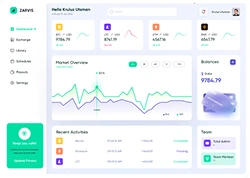


A SaaS admin panel is a secure internal interface that allows authorized users to manage the application's users, data, configurations, billing, and permissions from one centralized location.
Admin panels power the operational backbone of every SaaS product. A poorly designed admin panel slows down internal teams, increases support tickets, and creates security vulnerabilities. This guide covers what a SaaS admin panel is, why its design directly impacts product success, and the 7 core UX principles that separate functional panels from exceptional ones.
What Is a SaaS Admin Panel?
A SaaS admin panel is a backend control interface where internal teams and authorized administrators manage users, configure system settings, handle billing, enforce permissions, and monitor platform activity without touching code.
The admin panel differs from a user-facing dashboard in 1 critical way: an admin panel centers on action and control, while a dashboard centers on visibility and insight. Many SaaS products combine both in a single interface, but the distinction matters for design decisions. For a deeper look at how dashboards are structured separately from admin controls, read How to Design a SaaS Dashboard That Users Actually Understand.
What is the Importance of Admin Panel Design?
SaaS admin panels serve a different audience than the product's end users. SaaS UX design targets power users or professionals who rely on the software daily for specific tasks such as managing accounts, reviewing analytics, or configuring access levels. A poorly designed panel forces these users to work around the interface instead of through it.
There are 4 measurable ways admin panel design directly impacts SaaS business outcomes:
1. Team productivity. Better UX directly improves team productivity and reduces onboarding time. Admins navigating an unclear interface waste time on tasks a well-structured panel handles in seconds.
2. Security posture. Admins manage users, billing, and settings. Managers handle projects and limited groups. Users access only what their role permits. This separation of concerns is essential for security, compliance, and usability.
3. Churn reduction. Poor admin UX frustrates the internal operators who manage your customers, and that friction eventually reaches end users. SaaS churn rarely starts with the product itself. It starts with the operational breakdowns a weak admin panel fails to prevent.
4. Scalability. Admin panels are becoming more composable. Rather than rigid, all-in-one systems, teams build flexibility that supports long-term growth and changing business needs.
7 Core UX Principles for SaaS Admin Panel Design
1. Role-Based Access Control (RBAC) as the Foundation
Role-Based Access Control (RBAC) is a permission architecture that assigns each user a role such as Admin, Manager, or Viewer and restricts their access to only the features and data that role requires.
A robust RBAC system ensures admins manage users, billing, and settings, and it is a core part of SaaS security management that directly impacts customer trust.
Admin panels support 5 standard user management actions: viewing and searching users, creating or editing users, activating and deactivating users, bulk user import, and IDP/SSO configurations.
RBAC solves 3 specific design problems:
- Cognitive overload: Users see only what is relevant to their role, not the full interface.
- Security risk: Unauthorized access to sensitive settings is prevented by design.
- Onboarding friction: Bundling permissions into roles based on minimum necessary access streamlines onboarding and reduces administrative complexity.
2. Clear Information Hierarchy
Information hierarchy in admin panel design means organizing content so the most critical data and actions appear first, before secondary and tertiary information.
A strong hierarchy prevents cognitive overload by pre-organizing data importance. It ensures the primary purpose of the panel, whether monitoring user activity or managing billing configurations, is fulfilled instantly.
To establish visual hierarchy effectively, arrange elements along an F-pattern or Z-pattern. These are the 2 natural scanning paths human eyes follow when reading interface content.
Apply information hierarchy across 3 levels:
- Level 1 (Primary): Key metrics, critical alerts, and the most-used actions, visible immediately on page load.
- Level 2 (Secondary): Filters, configuration options, and detailed data tables, accessible with 1 interaction.
- Level 3 (Tertiary): Audit logs, historical data, and advanced settings, available on demand.
3. Progressive Disclosure
Progressive disclosure is a UX principle where complex information reveals itself gradually, starting with high-level summaries and exposing details only when the user requests them.
Progressive disclosure prevents cognitive overload and improves performance by showing information at the moment it is needed, not all at once.
In admin panel design, progressive disclosure applies to 3 specific areas:
- User tables: Show name, email, and role by default. Reveal permissions, activity history, and billing details on row expansion.
- Settings panels: Display core configuration options first. Nest advanced settings under an "Advanced" toggle.
- Analytics: Surface top-line KPIs on the main view. Link to detailed breakdowns on a separate page. For a breakdown of which KPIs belong at the top level, SaaS metrics covers the specific performance indicators, including MRR, NRR, CAC, and churn, that admin-level visibility should prioritize.
4. Data Density Without Cognitive Overload
Data density in admin panels refers to the volume of information displayed per screen, and managing it correctly determines whether admins make fast decisions or experience analysis paralysis.
Prioritize ruthlessly. Show only the 3 to 5 most critical metrics. Use a single-column layout with cards stacked vertically in priority order.
Modern admin panels handle large volumes of data efficiently, going far beyond simple CRUD operations. Advanced data tables with flexible views allow teams to quickly find and act on the information they need.
3 design decisions that control data density effectively:
- Inline actions: Allow users to edit, activate, or delete records directly in the table without navigating to a separate page.
- Contextual filtering: Provide filters at the top of every data table, not in a separate settings menu.
- Pagination vs. infinite scroll: Use pagination for admin tables. It gives users a sense of data volume and makes bulk actions predictable.
Overcrowding admin screens is one of the hidden SaaS UX mistakes that silently reduces team efficiency, often without anyone identifying the interface as the cause.
5. Consistent Navigation Patterns
Navigation consistency in SaaS admin panels means using the same structural patterns, labels, and interaction models across every section of the interface.
Role-based navigation has become the baseline, not an enterprise-only feature. SaaS admin panels that still use a flat, undifferentiated navigation structure signal weak product investment to senior buyers.
Navigation patterns that users are already familiar with, like left-hand navigation bars, hamburger menus, and tabbed pages, reduce the learning curve and accelerate task completion.
The left-hand sidebar is the standard navigation pattern for SaaS admin panels for 1 core reason: it keeps the full menu visible at all times without consuming the primary content area.
4 navigation consistency rules for admin panels:
- Use the same icon set throughout. Never mix icon styles between sections.
- Label menu items with nouns, not verbs (e.g., "Users" not "Manage Users").
- Highlight the active section with a persistent visual indicator.
- Keep critical actions like "Invite User" or "Create Workspace" in the same position across all pages.
6. Audit Logs and Accountability Trails
An audit log is a timestamped record of every significant action performed in the admin panel, covering who did what, when, and on which resource.
A strong admin panel includes built-in analytics that transform raw data into actionable insights, helping teams monitor performance, identify trends, and optimize product strategy.
Audit logs serve 3 distinct purposes in SaaS admin panel design:
- Security compliance: Regulators and enterprise buyers require proof of who accessed or modified sensitive data.
- Incident investigation: When a misconfiguration occurs, audit logs identify the exact change, timestamp, and responsible user.
- Accountability: Teams operate more carefully when their actions are logged and visible to supervisors.
Design audit logs to display 5 data points per entry: actor (user), action type, affected resource, timestamp, and IP address.
7. Responsive Feedback and System Status
System status visibility means the admin panel continuously communicates what is happening, including loading states, success confirmations, error messages, and in-progress operations, so admins never wonder whether their action registered.
When a billing dashboard surfaces a single "Amount overdue this month" card with a clear CTA, teams often see support tickets about invoices drop noticeably and time-to-payment improve.
Apply responsive feedback across 4 interaction types:
- Form submissions: Display inline validation errors as the user types, not after submission.
- Bulk actions: Show a progress indicator with a count (e.g., "Updating 47 of 200 users...").
- Destructive actions: Require a confirmation step with explicit consequence language (e.g., "This permanently deletes 3 workspaces and 214 users. This action cannot be undone.").
- Empty states: Replace blank tables and empty views with contextual prompts that guide the admin toward the next action.
Poor feedback design is a direct driver of admin error rates, and it connects directly to the broader SaaS UX design best practices that reduce churn at the interface level.
What Are the Differences Between an Admin Panel and a Dashboard?
There are 5 core differences between an admin panel and a dashboard in SaaS. An admin panel is an action-oriented backend interface where operators manage users, configure settings, handle billing, and control permissions. A dashboard is an observation-oriented interface where users monitor KPIs, track metrics, and read performance data at a glance.
The simplest way to separate the two: an admin panel is a tool for operators, and a dashboard is a tool for observers. Operators act. Observers understand.
In practice, most SaaS products combine both in a single interface. The admin panel contains the dashboard as one of its components. The dashboard displays what is happening. The admin panel controls what happens next.
Summary
A SaaS admin panel is the operational control center of every cloud product. Its design determines how fast internal teams work, how secure the platform remains, and how confidently administrators manage users and configurations at scale.
The 7 core UX principles for SaaS admin panel design are:
- Role-Based Access Control (RBAC) as the foundation
- Clear information hierarchy
- Progressive disclosure
- Data density management
- Consistent navigation patterns
- Audit logs and accountability trails
- Responsive feedback and system status visibility
Each principle solves a specific operational problem. Together, they transform an admin panel from a functional necessity into a competitive advantage.




.avif)