.svg)

.svg)
%201.svg)


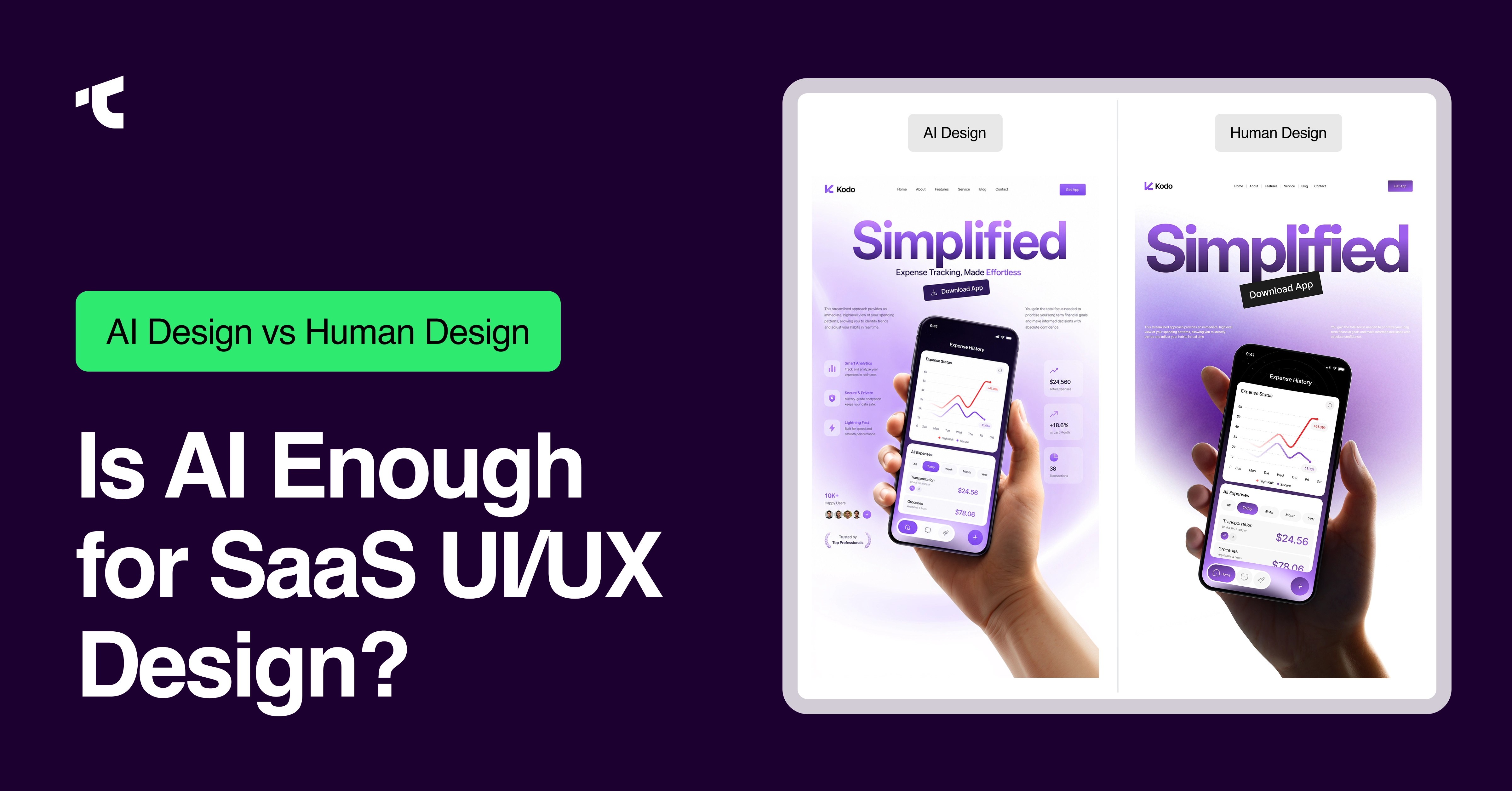
Is AI capable of doing UI UX design well enough to replace a design team? For a first clickable prototype, often yes. For a SaaS product that needs to convert trial users, pass investor due diligence, and scale past a handful of screens, the answer changes completely.
AI-powered design tools have changed how SaaS founders build their first product screens. Tools like Figma Make, Claude, Uizard, and Galileo AI turn a text prompt into a working mockup within minutes, and that speed has convinced a growing number of founders that a UI UX design agency is now optional.
This article breaks down what AI can actually do in UI UX design today, where it consistently fails, and why founders who skip human designers past the MVP stage usually pay for that decision later, through rebuilds, churn, and lost conversions. The goal is not to dismiss AI design tools. It is to show founders exactly where AI's help ends and where a professional UI UX design agency's value begins.
Can AI Do UI UX Design?
AI can do UI UX design at a basic level, generating wireframes, mockups, and layout drafts in minutes, but it cannot independently handle user research, accessibility compliance, brand strategy, or design system governance, which a complete UI UX design process requires.
That distinction matters more than the yes/no question itself. AI does not "do design" the way a trained UI UX designer does. A designer starts with a business goal, researches real users, tests assumptions, and iterates based on behavior data. AI starts with a prompt and returns the statistically most common layout for that type of screen. This is a human-centered design vs AI design question at its core: human-centered design starts with the user's problem, while AI design starts with pattern prediction. The output can look polished immediately. It rarely reflects a specific user's problem, a specific brand's voice, or a specific product's growth plan, three things AI design cannot originate on its own.
What Can AI Actually Do in UI UX Design Right Now?
AI actually does six specific things well in UI UX design today:
- Generates wireframes and mockups: AI design tools such as Figma Make, Claude, and Uizard can turn a written prompt into an editable screen in minutes; Uizard alone packages nine different AI tools into one platform for this exact purpose.
- Creates multiple layout directions: A single prompt can produce four or five different visual approaches, so a team can compare directions before committing to one.
- Suggests color palettes and typography: AI cross-references common design patterns to recommend combinations that read as "clean and modern," based on established visual conventions rather than a specific brand strategy.
- Drafts placeholder UX copy: Tools populate buttons, empty states, and onboarding screens with realistic text instead of lorem ipsum, so stakeholders react to something close to real.
- Speeds up early-stage prototyping: Founders can put a concept in front of early users or investors in hours instead of weeks, which is genuinely valuable before product-market fit exists.
- Converts design files into starter code: Tools such as Figma Make and v0 turn a screen into working front-end code, shortening the design-to-development handoff.
Every one of these six tasks is real, useful, and worth using inside a startup's workflow. None of them is UI UX design for SaaS products in the complete sense. They are inputs into design, not design itself, and that gap is exactly where the disadvantages of AI in UI UX design start to show up.
Why Can't AI Do UI UX Design Alone?
The disadvantages of AI in UI UX design, and the limitations of AI in design more broadly, come down to five structural gaps. Why AI cannot design your SaaS UI UX comes down to what AI never sees: your actual users.
- Skips real user research: AI cannot sit in on a customer call, notice a hesitant pause, or ask a follow-up question. Qualitative user research still requires a human in the room, and user empathy in design cannot be prompted into existence.
- Produces generic, templated layouts: AI defaults to the safest pattern in its training data: a hero section, a card grid, rounded corners, and a purple-to-blue gradient. Ten different SaaS products can prompt the same tool and get near-identical screens back, a clear AI wireframe generator limitation that only shows up once you compare outputs side by side.
- Misses accessibility requirements: AI-generated interfaces routinely fail WCAG 2.1 AA contrast ratios, skip alt text, and produce touch targets smaller than the 44-pixel minimum real users need, creating AI UX accessibility issues that surface only after launch.
- Breaks design system consistency at scale: AI handles one screen well. It struggles to keep buttons, spacing, and states consistent across the 40-plus screens a real SaaS product eventually needs.
- Ignores brand identity and emotional positioning: A healthcare app, a finance app, and a project management tool should not feel the same. Brand identity is one of the clearest limitations of AI design tools: they apply the same "modern clean" style to all three unless a human designer intervenes.
AI design is not recommended for your SaaS because of these five gaps, and every one of them shows up after launch, during onboarding, during a funding round, or during the first serious growth push.
Why Does Every AI-Generated UI Look the Same?
Every AI-generated UI looks the same because generative models return the statistical average of every interface in their training data, not an original decision made for a specific product or user.
Designers call this pattern distributional convergence. An AI model does not choose a layout; it predicts the most probable next choice based on millions of existing screens. Prompt ten different SaaS products with "design a clean, modern dashboard," and most tools return a near-identical result: an Inter or similar sans-serif font, a purple accent color, three stat cards along the top, and a sidebar on the left. This is the generic AI design template problem, and it is not a bug in any one tool; it is how every current AI design tool works by default when a prompt is vague.
For a founder, this is not just an aesthetic complaint. It is a market positioning problem. When a SaaS product looks and behaves like every competitor that typed a similar prompt, the product loses one of its strongest levers for differentiation before it even launches. Whether a user trusts the AI-generated design often comes down to details AI does not prioritize on its own, consistent spacing, clear error states, accessible contrast, and a visual identity that feels intentional rather than templated. Fixing that generic look later, after users have already formed an impression, costs significantly more than designing with intent from day one.
Can AI Replace UX Research for Your Product?
AI cannot replace UX research for your product. AI can summarize interview transcripts and highlight patterns in existing data, but it cannot conduct a live interview, read body language, or notice what a user does not say.
This limitation matters more for SaaS products than almost any other category, because SaaS retention depends on solving a specific workflow problem for a specific type of user. User empathy in design comes from watching someone struggle with a signup form, not from a model summarizing survey responses. AI-generated personas are built from broad statistical patterns and often do not reflect how a real customer actually behaves. Teams that skip human-led research and rely only on AI insights tend to design for an "average user" who does not exist, then build a product that undersells the actual needs of the customers who are supposed to pay for it.
AI vs Human UI UX Design: Which Is Better for Your Product?
Does AI do UI UX design better than humans? For speed, yes. For everything a SaaS product needs to retain paying customers, no. The table below compares AI design tools and human UI UX designers across the factors that actually affect a SaaS product's growth.
Figma AI vs. a human designer is a comparison most SaaS teams run into directly, since Figma Make now sits inside the same tool many teams already use daily. Figma Make can turn a written prompt into a working, code-backed prototype in minutes, a genuine leap from manual wireframing. Figma's own guidance for its AI tools still recommends treating every output as a starting reference rather than a finished decision, since results can be inconsistent or simply inaccurate. That caution, coming directly from the tool's own maker, is strong evidence that even the most capable AI prototyping tool available today still needs a human designer's judgment before anything ships to real users.
Problem framing separates the two approaches most clearly. A human UI UX designer starts by defining the problem: who the user is, what they are trying to accomplish, and where they get stuck. AI starts by generating a solution to whatever problem the prompt implies. Skipping problem framing is exactly why AI UI design fails for startups that treat a first draft as a finished product, and it is why AI product design accuracy tends to drop sharply once a screen depends on real usage data AI has never seen.
What Are the Risks of Using AI for Product Design?
Using AI for product design carries five real risks for a growing SaaS company.
- Raises churn: A generic, confusing onboarding flow is one of the fastest ways to lose a trial user in the first session.
- Triggers expensive rebuilds: A product built entirely on AI-generated screens usually needs a full redesign once it needs to scale, and that rework costs far more than designing with intent from the start.
- Flags due diligence concerns: Investors and technical reviewers increasingly recognize AI-only interfaces at first sight and treat them as a rebuild risk before funding a round.
- Exposes accessibility and legal risk: Automated and AI-assisted accessibility checks still catch only a fraction of real WCAG issues, and digital accessibility lawsuits have climbed into the thousands every year since 2023.
- Dilutes brand identity: A product that looks like every other AI-generated SaaS tool has nothing distinct for users to remember or recommend.
The cost of bad UI UX design for SaaS rarely shows up on day one. It shows up three to six months later, in a support queue full of confused users, a stalled trial-to-paid conversion rate, and a redesign budget nobody planned for. These patterns line up closely with the common SaaS UX mistakes we see across early-stage products, and a confusing, inconsistent interface remains one of the most common reasons SaaS products fail in their first year.
AI Design Tools vs. Hiring a UI UX Design Agency: Cost Comparison
How much does AI UI design cost vs. an agency? Most AI design tools run $0 to $50 per month in subscription fees. A UI UX design agency typically costs more upfront, but the comparison only makes sense once it accounts for what each option actually delivers.
A typical SaaS MVP budget sets aside a meaningful design line item, commonly a few thousand dollars out of a $15,000 to $80,000 total build, for wireframes, prototypes, and design system foundations. Skipping that line item to save money with AI-only tools does not remove the cost. It defers the cost to a later, more expensive rebuild, once the product has real users, and a redesign means migrating existing customers instead of shipping a first version.
AI design tools ROI for startups looks strong in the first month and weak by month six, once churn, support tickets, and a stalled conversion rate start eating into the early savings. A full SaaS UI UX design cost breakdown makes this comparison concrete: agency pricing reflects research, testing, and long-term design system work that a monthly AI subscription does not include.
Is AI Ready to Do UI UX Design for SaaS Products at Scale?
AI is not ready to do UI UX design for SaaS products at scale. It handles a single screen well but cannot maintain consistency, accessibility, and conversion performance across the dozens of screens and states a growing SaaS product needs.
This is the gap that catches most founders off guard, and it is why AI-only design is not recommended for your SaaS product past the MVP stage. Building an MVP with AI is genuinely fast; a founder can validate a product idea with real users in days rather than months. Scaling that same AI-generated interface is a different problem entirely. Can AI handle UI UX design for your product a year after launch, once it has user roles, permission states, edge cases, empty states, error states, and a dozen integrations? Every one of those needs to look and behave as if it belongs to the same product, and AI tools generate each new screen as an isolated task. They do not remember the design decisions made three months earlier, and they do not enforce the design system that keeps a growing product feeling coherent.
Is AI UX design reliable for SaaS products past this point? Not without a human designer directing it. This is precisely where the real value of UI UX design becomes visible, not in the first prototype, but in the fiftieth screen, when consistency, accessibility, and conversion all depend on decisions no prompt can make on its own.
Should You Hire a UI UX Agency or Use AI for Your Startup?
Use AI design tools for your first clickable concept if your SaaS product has no paying users yet and you only need to validate an idea. Bring in a professional UI UX design agency if your product needs to convert paying customers, pass investor due diligence, or scale past a handful of screens.
Should I hire a UI UX agency or use AI for my startup is rarely an either-or decision in practice. Many SaaS teams use both: AI tools for quick internal exploration, and a design agency for the research, system, and testing work that ships a product that real customers can rely on. AI tools vs. a professional UI UX design agency is not a competition, it is a sequence. AI is useful before product-market fit. A design agency is what makes product-market fit repeatable across every new screen after that.
Teams weighing this decision often compare a design agency vs. an in-house hire at the same time, since the underlying question is similar: who owns design quality as the product grows? Once that decision is made, choosing the right SaaS UI UX design agency involves walking through the evaluation criteria that matter most.
Frequently Asked Questions About AI and UI UX Design
Can AI do UI UX design for startups?
AI can do UI UX design for startups at the earliest idea stage, producing wireframes and mockups within minutes. It cannot replace the user research, accessibility testing, and design system planning a startup needs before a real product launch.
Can AI do UI UX design from scratch?
AI can do UI UX design from scratch for a first concept, generating a full screen from a text prompt in minutes. It cannot originate the user research, brand strategy, or product context that turns a generated screen into a design that real customers trust.
Can AI do professional UI UX design?
AI cannot do professional UI UX design on its own. Professional design combines user research, accessibility compliance, brand strategy, and iterative testing, four disciplines current AI design tools do not perform without a trained designer directing the process.
Can AI do UI UX design without human input?
AI cannot do UI UX design without human input for any product built for real users. Every AI-generated layout still needs a human to define the user, set the brand direction, check accessibility, and validate the result against real behavior.
Can AI do UI UX design as well as an agency?
AI does not do UI UX design as well as a design agency for SaaS products. Agencies combine user research, custom visual systems, accessibility audits, and conversion testing into one process that AI tools alone do not replicate today.
What happens when AI does UI UX design without a human reviewing it?
When AI does UI UX design without a human reviewing it, the result is usually a generic layout with accessibility gaps and inconsistent components — problems that surface as churn and support tickets once the product reaches real customers.
Is AI good enough to do UI UX design at scale?
AI is not good enough to do UI UX design at scale on its own. It handles single screens well but struggles to keep components, states, and flows consistent across the many screens a growing SaaS product eventually needs.
The Bottom Line
Can AI do UI UX design on its own, from scratch, for a SaaS product ready to scale? Not yet, and not for any of the reasons that determine whether a product actually retains its users. AI does UI UX design well enough to validate an idea in a weekend. It does not do UI UX design well enough to carry a SaaS product through its first year of paying customers, its first investor due diligence process, or its first serious growth push.
This is exactly why founders who build their MVP with AI still come back to a UI UX design agency once the product needs to scale. AI gets them a working prototype. A design agency is what turns that prototype into a product people trust, recommend, and pay for every month.
If your SaaS product has outgrown its AI-generated interface, it may be time to hire a UI UX design agency for your SaaS — one that can rebuild it around real user research, a proper design system, and conversion-focused UX instead of another round of generic screens. Taqwah's UI UX design services for startups work with SaaS teams at exactly this stage, and a free SaaS hero section audit is a fast way to see where your current design is costing you conversions today.




.avif)